Registering for a league
Open a league from the Leagues list and choose Sign Up. You need to be logged in to register: if you aren't, you are sent to the login page and brought straight back. The Sign Up tile only shows while registration is open. Before it opens the page says when registration opens, and after it closes the page says when registration closed. League admins can still register players outside those dates.
Pickup leagues work differently; see Pickup leagues below.
Who you are registering
The top of the form asks Registering For:
- Myself: uses your own account. You don't need to type your name or email. This option is missing if you are already registered for the league.
- Family Member: pick someone from your family list, or choose Add a family member..., enter their first name, last name and gender, and press Add. See Family members.
- Guest Player: for a friend who doesn't have an account. Enter their first name, last name, email and gender.
- Another Player: league admins only. Search for anyone already on the site by name and pick them.
The form
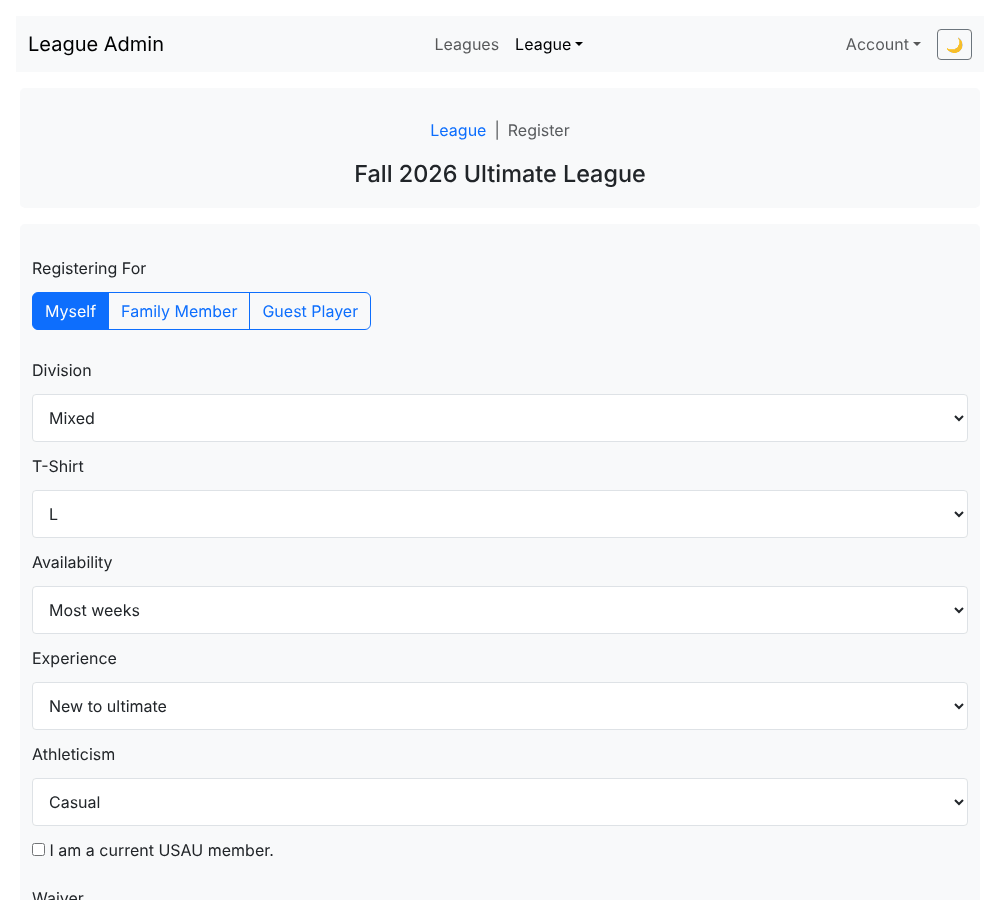
- Division, Availability, Experience and Athleticism: pick the option that fits. The choices come from the league, and the league's organizers use your answers to build balanced teams.
- T-Shirt: choose a size, including Child Large.
- I am a current USAU member: tick it if it applies.
- Waiver: read it and tick Accept. You can't register without accepting.
Press Submit. A green "Congrats! You are registered." message means it worked, and a confirmation email is sent (registration confirmations are always sent; see Your profile and email).
If something goes wrong
- You are already registered for this league. You'll see a notice and can still register another person.
- "... is already registered for one of those divisions." That person already has a registration in that division.
- "That person should log in to register themselves." The email you entered belongs to a person with an account. Ask them to log in and register, or register them yourself as a family member if they are your family. League admins can use Another Player instead.
- "... is already registered." A guest with that name and email is already registered for that league and division.
Registering someone else never changes their existing account details. The confirmation email says who registered them.
Next: pay your league fee.
Pickup leagues
A pickup league has no sign-up form, division or shirt size. Its home page has a Join the Pickup card instead. Log in, then press Register to be on the list for pickup games, or Withdraw to come off it (you can still withdraw after registration closes). Under Register another player you can search for someone and register them, and Register a guest adds a drop-in who doesn't have an account: enter their name, gender and email, or tick Email unknown. Registering puts you on the list; to say you are coming to a particular game, RSVP.
Last reviewed 2026-10-22