Bringing over older registrations
Before the current login system, registrations were not tied to an account. If you played in earlier seasons, you can attach those registrations to your account so your league history and stats are all in one place.
- Open the Account menu, choose Profile, then Migrate League Registrations. You are also taken here right after your first-login form.
- Look at the registrations the site found, in these sections:
- Matches your name exactly: pre-selected because they match your first and last name.
- Also registered under your email: registrations made with your email but a different name. They might be you under an older spelling, or you registering a friend or family member. Select the ones that are you. Their name changes to yours. Leave a friend's or family member's registration unselected; an admin will migrate friends later.
- Already on your login: registrations that can't be migrated because you're already registered for that league and division. This is rare; see below.
- Where two older records collide, choose one, or None of these -- leave them as they are.
- Submit. The next page tells you how many registrations were migrated and how many were skipped.
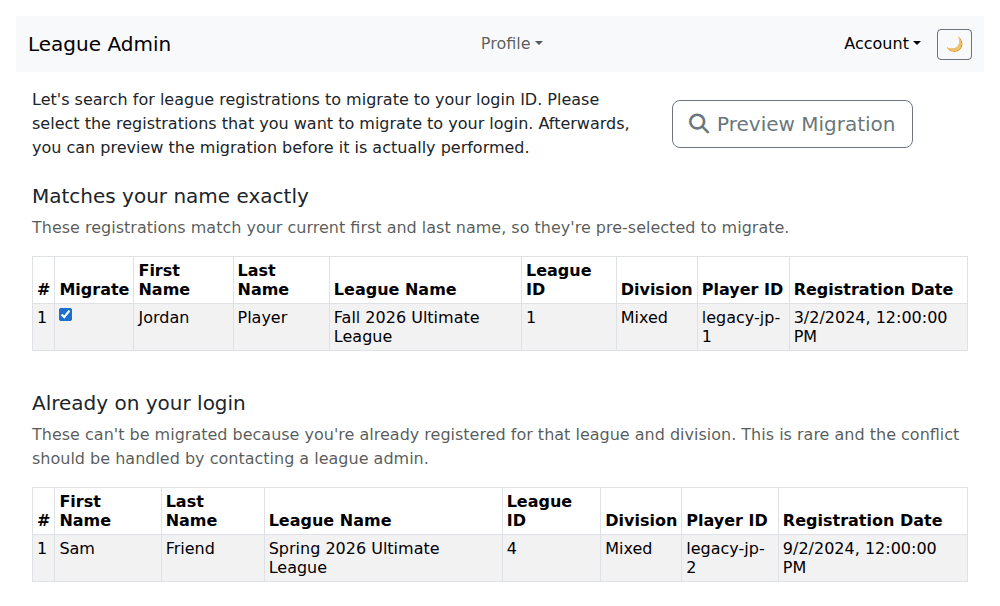
Registrations that can't move because you're already registered for that league and division are skipped. This is rare; email support@orlandodisc.org to sort it out.
If nothing is found when you first sign up, this step is skipped and you go straight to the main page. Visiting the page later from your profile shows "No registrations found to migrate".
Last reviewed 2026-10-10